コントローラでバリデーション情報(入力エラー情報)を取得する方法
通常、バリデーションはsaveやsaveAllを実行したときに発動し、入力方法に関するメッセージ(バリデーション情報)が画面に表示される。しかし、コントローラ内でも、任意のタイミングでバリデーション情報を取得できる。
方法は以下の通り。
	//コントローラクラス内の処理

	$errors = $this->TestHasManyA->validationErrors;
$errorsはバリデーション情報。
TestHasManyAはバリデーションの定義をしているモデル。
DBからデータを取得するコード
基本的なデータ取得処理。
		if(empty($this->Animal)){
			App::uses('Animal','Model');
			$this->Animal=ClassRegistry::init('Animal');
			//$this->Animal=new Animal();
		}

		//SELECT情報
		$fields=array(
			'id',
			'xxx',
			'name',
		);

		//WHERE情報
		$conditions=array(
			"id = {$id}",
			"xxx = '{$xxx}'",
			"delete_flg = 0",
		);

		//ORDER情報
		$order=array('sort');

		//オプション
		$option=array(
			'fields'=>$fields,
			'conditions'=>$conditions,
			'order'=>$order,
			'recursive' => -1,
		);

		//DBから取得
		$data=$this->Animal->find('all',$option);

		//2次元配列に構造変換する。
		if(!empty($data)){
			$data=Hash::extract($data, '{n}.Animal');
		}

		return $data;
DBからデータを取得するコード(JOIN)
基本的なデータ取得処理。
		if(empty($this->Animal)){
			App::uses('Animal','Model');
			$this->Animal=new Animal();
		}

		//SELECT情報
		$fields=array(
			'Animal.id',
			'Animal.xxx',
			'Animal.name',
			'Food.name',
		);

		//WHERE情報
		$conditions=array(
			"Animal.xxx = '{$xxx}'",
			"Animal.name like '%{$name}%'",
		);

		//ORDER情報
		$order=array('Animal.sort');

		//JOIN情報
		$joins = array(
				array(
						'type'       => 'left',//innerも指定可能
						'table'      => 'foods',
						'alias'      => 'Food',
						'conditions' => array(
								'Animal.food_id = Food.id',
						),
				),
				//他に連結するテーブルがあれば上記のような配列を連結

		);

		//オプション
		$option=array(
			'fields'=>$fields,
			'conditions'=>$conditions,
			'joins'=>$joins,
			'order'=>$order,
			'recursive' => -1,
		);

		//DBから取得
		$data=$this->Animal->find('all',$option);


		//データ構造を変換(2次元配列化)
		$data2=array();
		foreach($data as $i=>$tbl){
			foreach($tbl as $ent){
				foreach($ent as $key => $v){
					$data2[$i][$key]=$v;
				}
			}
		}

		return $data2;

		//データを構造変換してエンティティを取得
		//$ent=array();
		//if(!empty($data)){
		//	foreach($data as $i=>$tbl){
		//		foreach($tbl as $key=>$v){
		//			$ent[$key]=$v;
		//		}
		//	}
		//}
		//return $ent;
DBからエンティティを取得するひな形 | シンプル版
DBからレコードをエンティティと取得する、シンプルなコード。
	//DBからエンティティを取得
	$ent = $this->find('first',
			array(
					'conditions' => "id={$ent['Neko']['id']}"
			));
	$ent=$ent['Neko'];
findで実行するSQLを取得する
	//SELECT情報
	$fields=array(
		'id',
		'xxx',
		'name',
	);

	//WHERE情報
	$conditions=array(
		"id = {$id}",
		"xxx = '{$xxx}'",
		"delete_flg = 0",
	);

	$dbo = $this->Neko->getDataSource();

	//オプション
	$option=array(
			'table' => $dbo->fullTableName($this->Neko),
			'alias' => 'Neko',
			'fields'=>$fields,
			'conditions'=>$conditions,
	);

	$sql = $dbo->buildStatement($option,$this->Neko);
	//$sql → SELECT ... FROM nekos AS Neko WHERE ...
SELECTフォーム用のデータをDBから取得するひな形
	/**
	 * カテゴリIDに紐づくアニマルリストを取得する
	 * @param int $category_id カテゴリID
	 * @return アニマルリスト
	 */
	public function getAnimalList($category_id){
		if(empty($this->Animal)){
			App::uses('Animal','Model');
			$this->Animal=ClassRegistry::init('Animal');
		}

		//SELECT情報
		$fields=array(
				'id',
				'animal_name',
		);

		//WHERE情報
		$conditions=array(
				"category_id = {$category_id}",
				"delete_flg != 1",
			);

		//ORDER情報
		$order=array('animal_name');

		//オプション
		$option=array(
				'fields'=>$fields,
				'conditions'=>$conditions,
				'order'=>$order,
		);

		//DBから取得
		$data=$this->Animal->find('all',$option);

		//構造変換
		$list = array();
		if(!empty($data)){
			$list=Hash::combine($data, '{n}.Animal.id','{n}.Animal.animal_name');
		}


		return $list;
	}
ログインとユーザー認証 | 認証状態の確認および認証不要ページ
通常、未認証でページアクセスしようとすると、自動的にログイン認証ページに飛んでしまう。※未認証でもページを表示させたい場合、beforeFilterアクションに「$this->Auth->allow();」を記述する。
認証状態と未認証状態を判定
認証状態と未認証状態を判定することもできる。「$this->Auth->user()」が空であるなら未認証であり、空でないなら認証中である。
特定のメソッドだけ未認証を許可する
特定のアクションだけ未認証を許可する場合、引数に許可するアクション名(メソッド名)を指定する。$this->Auth->allow('test_action');
Controller
	class NoAuthController extends AppController {

		public $name = 'NoAuth';

		public function beforeFilter() {
			$this->Auth->allow(); // 認証と未認証の両方に対応したページする。
			parent::beforeFilter();//基本クラスのメソッドを呼び出し。
		}

	    public function index() {
	    	$msg="認証されていません。";
	    	if(!empty($this->Auth->user('id'))){
	    		$msg = "認証中です。";
	    	}
	    	$this->set(array('msg'=>$msg));
	    }

	}
View
	<a href="users/login">ログイン</a><br>
	<a href="users/logout">ログアウト</a><br>
	<br>
	<?php echo $msg?>
ログインリンクとログアウトリンクの作成方法
View(ctpファイル)に以下のリンクを作成するだけである。<a href="users/login">ログイン</a> <a href="users/logout">ログアウト</a>
完全な認証不要のページ
完全にログイン認証を不要とする場合、コントローラのメンバに「$components=null;」を指定する。ただし、この方法では認証中か未認証かを判定することはできない。
Controller
	class DemoController extends AppController {
		public $name = 'Demo';
		public $components=null;//ログイン認証不要

		public function index(){

		}
	}
Ajaxとログイン認証
Ajaxでアクションにアクセスする場合でも、認証中と未認証で処理を分けることができる。これにより、認証中のときだけデータを取得するということができる。
Controller/NoAuthController.php
	class NoAuthController extends AppController {

		public $name = 'NoAuth';

		public function beforeFilter() {
			$this->Auth->allow(); // 認証と未認証の両方に対応したページする。
			parent::beforeFilter();//基本クラスのメソッドを呼び出し。
		}


		public function ajax_auth(){

		}

		// AJAXで呼び出されるアクション
		public function ajax_auth_test1(){

			$this->autoRender = false;//ビュー(ctp)を使わない。

			// ★認証状態の確認
			if(empty($this->Auth->user('id'))){
				return '認証されていません';
			}

			$json_param=$_POST['key1'];

			return $json_param;
		}
	}
View/NoAuth/ajax_auth.ctp
	<input type="button" value="test1" onclick="test1()" />
	<div id="xxx"></div>
JavaScript
	function test1(){

		var data={'neko':'ネコ','same':{'hojiro':'ホオジロザメ','shumoku':'シュモクザメ'},'xxx':111};
		var json_str = JSON.stringify(data);

		$.ajax({
			type: "POST",
			url: "/cake_demo/no_auth/ajax_auth_test1",
			data: "key1="+json_str,
			cache: false,
			dataType: "text",
			success: function(str_json, type) {
				$("#xxx").html(str_json);
			},
			error: function(xmlHttpRequest, textStatus, errorThrown){
				$('#xxx').html(xmlHttpRequest.responseText);//詳細エラーの出力
			}
		});
	}
test1ボタンを押した時の出力
認証中のとき{"neko":"ネコ","same":{"hojiro":"ホオジロザメ","shumoku":"シュモクザメ"},"xxx":111}
未認証のとき
認証されていません
ラジオボタンのヘルパー
ビュー(ctpファイル)
		echo $this->Form->input('animal', array(
				'legend' => false,
				'type' => 'radio',
				'value'=>'usi',//初期選択値
				'options' => array('neko'=>'猫','nezumi'=>'ネズミ','usi'=>'牛','tora'=>'虎',)
		));
value属性を省略したり、nullを指定すると、未選択状態になる。
IDに紐づく名称をセットする汎用アルゴリズム
通常、IDに紐づく他のテーブルのレコードの値を引っ張ってくる場合、DBのJOINを用いる。しかし、なんらかの事情で、JOINが使えない場合もあるかもしれない。
この場合、以下のソースコードが便利。
紐づけ情報の変数を適当に変えるだけで汎用的に利用できる。
モデル:Category.php
	/**
	 * カテゴリ名をマッピング
	 * データの指定IDに紐づく名称をカテゴリテーブルからとってきて、データにセットする。
	 * @param  $data データ
	 * @return データ
	 */
	public function mapping($data){

		//引数データの紐づけ情報
		$id_key='category_id1';
		$name_key='category_name1';
		$model_name1="RecCrud1";

		//結合先テーブルの紐づけ情報
		$id_key2='id';
		$name_key2='name';
		$model_name2="Category";


		// データからIDリストを取得
		$ids=array();
		foreach($data as $ent){
			$id=$ent[$model_name1][$id_key];
			if(!empty($ent[$model_name1][$id_key])){
				$ids[]=$ent[$model_name1][$id_key];
			}elseif($ent[$model_name1][$id_key]===0 || $ent[$model_name1][$id_key]==='0'){
				$ids[]=$ent[$model_name1][$id_key];
			}
		}

		// IDリストから重複するIDリストを削除
		$ids=array_unique($ids);

		if(empty($ids)){

			foreach($data as &$ent){
				$ent[$model_name1][$name_key]=null;
			}
			unset($ent);
			return $data;
		}

		// IN句をIDリストから作成する。
		$str_ids=join($ids,',');

		//元データをDBから取得
		$fields=array($id_key2,$name_key2);
		$conditions=array("id IN ({$str_ids})");
		$option=array(
				'fields'=>$fields,
				'conditions'=>$conditions,
				'recursive' => -1,
		);
		$mapData=$this->find('all',$option);

		//マッピングデータを作成
		$map=array();

		//マッピングデータを作成。ついでにサニタイズ
		if(!empty($mapData)){
			foreach($mapData as &$map_ent){
				$map[$map_ent[$model_name2][$id_key2]]=Sanitize::html($map_ent[$model_name2][$name_key2]);
			}
			unset($ent);
		}


		// データ件数分ループして、IDに紐づくマッピングのデータをセット
		foreach($data as &$ent){
			if(!empty($map[$ent[$model_name1][$id_key]])){
				$ent[$model_name1][$name_key]=$map[$ent[$model_name1][$id_key]];
			}else{
				$ent[$model_name1][$name_key]=null;
			}
		}
		unset($ent);

		return $data;


	}
h()関数の使い方
h()関数を使うと、文字列にHTMLが含まれる場合、エスケープして表示できます。XSS攻撃の対策につかうと便利です。
下記の例では、文字列を直接出力するとリンク化しますが、h()関数をはさむと、タグをそのまま出力します。
	$str1="→テスト<a href='#' onclick='alert(\"XSS攻撃のテスト\");'  > Hello</a>";

	echo h($str1);
CakePHP:オリジナルヘルパー(自作ヘルパー)
CakePHPでは自作のヘルパーであるオリジナルヘルパーを作ることができる。以下に2通りの方法を示す。
①プロジェクトで共通して使う汎用的なオリジナルヘルパーの場合
CakePHPに標準で用意されているAppHelper.phpにオリジナルヘルパーのメソッドを追加するだけである。使用方法はctpファイル内で以下のように記述するだけ。
$this->Html->test();
オリジナルヘルパーを作成する
app/View/Helper/AppHelper.php
	class AppHelper extends Helper {

		//オリジナルヘルパーとなるメソッド
		public function test($v){
			$v='大きい';
			return $v;
		}

	}
オリジナルヘルパーを使う
sample.ctp
	echo $this->Html->test('ネコ');
	//出力例 → 大きいネコ
②限られた範囲でのみ利用するオリジナルヘルパーの場合
限定した画面でしか使用しないオリジナルヘルパーは、AppHelperに記述すると無駄が生じます。この場合、AppHelper.phpを継承して自作ヘルパークラスを作成することにより、限定的なオリジナルヘルパーを実現できます。
自作ヘルパークラスはAppHelper.phpと同じフォルダ内であるView/Helperフォルダに作成します。
	class IrukaHelper extends AppHelper {
		public function test(){
			echo 'イルカ';
		}
	}
オリジナルヘルパーを使用する画面のコントローラにて、自作ヘルパークラスを設定します。
	class SampleController extends AppController {
		public $helpers = array('Iruka');
		~略~
オリジナルヘルパーを使用する場合、ビュー(ctp)に以下のように記述します。
sample.ctp
	$this->Iruka->test();
	//出力例 → イルカ
参考サイト
オリジナルヘルパーの動的な登録
ビュー(ctp)内で動的にヘルパーを登録することができる。test.ctp
	$this->FrontA = $this->Helpers->load('FrontA');
	$this->FrontA->test();
ヘルパークラス
app/View/Helper/FrontAHelper.php
	App::uses('Helper', 'View/Helper');
	class FrontAHelper extends Helper {
		public function test(){
			echo 'テストでござい';
		}

	}
Cake:SQLインジェクション対策された文字を元に戻す
Sanitize::clean(),Sanitize::escape(),Sanitize::html()などSQLインジェクション対策やXSS対策でエスケープされた記号等を元に戻します。ただし、XSS対策として「 < 」記号のみサニタイズします。
また改行コードはbrタグに変換します。
サンプルソースコード
public function uhtml_entity_decode_ex($v){
$v=html_entity_decode($v);//エスケープされた記号を元に戻す。
$v=str_replace('<','<',$v);//「 < 」記号のみサニタイズ
$v=nl2br($v);//改行コードをbrタグに変換
return $v;
}
アスキーアートなど記号をふんだんに使った文字列を表示させたいが、XSS対策は施したいといった場合の時に使うと便利です。
CakePHPとbootstrapの連動
おおまかな流れ
- bootstrapをダウンロードし組み込むファイルを用意する。
- bootstrapをCakeの指定箇所に配置する。
- app/View/Layouts/default.ctpを編集する。
1. bootstrapをダウンロードし組み込むファイルを用意する。
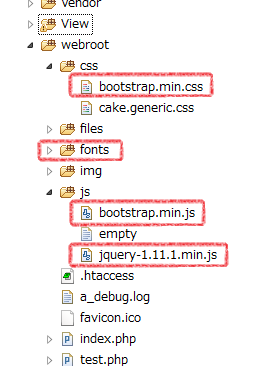
bootstrapを公式サイトから取得し、以下のファイルを用意する。
- css/bootstrap.min.css
- js/bootstrap.min.js
- font ←フォルダの中身ごと
- js/jquery-1.11.1.min.js ←これはjqueryのサイトから入手
2. bootstrapをCakeの指定箇所に配置する
app/webroot内に配置する。
3. app/View/Layouts/default.ctpを編集する
Cakeの全体スタイルを変更するにはapp/View/Layouts/default.ctpを変更する。
修正前 app/View/Layouts/default.ctp
		$cakeDescription = __d('cake_dev', 'CakePHP: the rapid development php framework');
		?>
		<!DOCTYPE html>
		<html>
		<head>
			<?php echo $this->Html->charset(); ?>
			<title>
				<?php echo $cakeDescription ?>:
				<?php echo $title_for_layout; ?>
			</title>
			<?php
				echo $this->Html->meta('icon');

				echo $this->Html->css(array(
					'cake.generic', //←これは、bootstrap.min.cssに置き換わる
					'http://ajax.googleapis.com/ajax/libs/jqueryui/1/themes/ui-lightness/jquery-ui.css'
				));

				echo $this->fetch('meta');
				echo $this->fetch('css');
				//echo $this->fetch('script');
				echo $this->Html->script(array(
						'http://ajax.googleapis.com/ajax/libs/jquery/1/jquery.min.js',
						'http://ajax.googleapis.com/ajax/libs/jqueryui/1/jquery-ui.min.js',
						'http://ajax.googleapis.com/ajax/libs/jqueryui/1/i18n/jquery.ui.datepicker-ja.min.js',
					));
			?>
			~ 以下略 ~
修正後 app/View/Layouts/default.ctp
			$cakeDescription = __d('cake_dev', 'CakePHP: the rapid development php framework');
			?>
			<!DOCTYPE html>
			<html>
			<head>
				<?php echo $this->Html->charset(); ?>
				<title>
					<?php echo $cakeDescription ?>:
					<?php echo $title_for_layout; ?>
				</title>
				<?php
					echo $this->Html->meta('icon');

					echo $this->Html->css(array(

						'bootstrap.min.css',
						'http://ajax.googleapis.com/ajax/libs/jqueryui/1/themes/ui-lightness/jquery-ui.css'
					));

					echo $this->fetch('meta');
					echo $this->fetch('css');
					//echo $this->fetch('script');
					echo $this->Html->script(array(
							'jquery-1.11.1.min.js',
							'http://ajax.googleapis.com/ajax/libs/jqueryui/1/jquery-ui.min.js',
							'bootstrap.min.js',
							'http://ajax.googleapis.com/ajax/libs/jqueryui/1/i18n/jquery.ui.datepicker-ja.min.js',
						));
				?>
				<script>
					$(function() {
						$("#datepicker").datepicker({
							dateFormat:'yy-mm-dd'

						});

						//2つ目の日付入力用
						$("#datepicker2").datepicker({
							dateFormat:'yy-mm-dd'

						});


			    	});
				</script>
				~ 以下略 ~
DBから1つのレコードを削除 | delete
DBからデータを削除する場合、deleteメソッドを使う。deleteメソッドの引数に、削除するidを指定すれば良い。
尚、削除は1行ずつである。
$ret=$this->モデル->delete(削除するID);
	//モデルクラス内で削除する場合。
	$ret=$this->delete(削除するID);
返値($ret)は削除に成功した場合、trueを返す。 何らかの理由で失敗した場合はfalseを返すが、 削除するidに紐づく行が既に存在しない場合もfalseを返すので注意が必要。
id以外の条件で削除したい場合、deleteAllメソッドを用いる。
トランザクションと組み合わせたサンプル
	// モデル生成
	if(empty($this->TestModel)){
		App::uses('TestModel','Model');
		$this->TestModel=new TestModel();
	}

	// トランザクション開始
	$dataSource = $this->TestModel->getDataSource ();
	$dataSource->begin();

	// ★削除処理 id=10000を削除
	$ret=$this->TestModel->delete(10000);

	if($ret==true){
		$dataSource->commit();//コミット
	}else{
		$dataSource->rollback();//ロールバック
	}
DBから複数のレコードを削除 | deleteAll
公式ドキュメントdeleteでは1行しか削除できないが、deleteAllで複数行をまとめて削除できる。
トランザクションも効く。
ソースコード
	$this->Neko->begin();//トランザクション開始
	$this->Neko->deleteAll(array('text1'=>'wani'));//複数行をまとめて削除
	$this->Neko->commit();
deleteAllで実行されるSQL
	SELECT `Neko`.`id` FROM `cake_smp`.`nekos` AS `Neko` WHERE `text1` = 'wani' GROUP BY `Neko`.`id`
	DELETE `Neko` FROM `cake_smp`.`nekos` AS `Neko` WHERE `Neko`.`id` IN (16, 17)
nekosテーブル
| id | val1 | text1 | test_date | test_dt |
|---|---|---|---|---|
| 15 | 3 | yagi | 2014/4/3 | 2014/12/12 0:00 |
| 18 | 3 | wani | 2014/4/3 | 2014/12/12 0:00 |
| 19 | 3 | wani | 2014/4/3 | 2014/12/12 0:00 |